Blogger templates

Backstreet Boys - Show Me the Meaning.mp3
Found at bee mp3 search engine

This is default featured slide 1 title

Go to Blogger edit html and find these sentences.Now replace these sentences with your own descriptions.

This is default featured slide 2 title

Go to Blogger edit html and find these sentences.Now replace these sentences with your own descriptions.

This is default featured slide 3 title

Go to Blogger edit html and find these sentences.Now replace these sentences with your own descriptions.

This is default featured slide 4 title

Go to Blogger edit html and find these sentences.Now replace these sentences with your own descriptions.

This is default featured slide 5 title

Go to Blogger edit html and find these sentences.Now replace these sentences with your own descriptions.

Wednesday, June 10, 2020

DOS (Denial Of Service) Attack Tutorial Ping Of Death ;DDOS

What is DoS Attack?

DOS is an attack used to deny legitimate users access to a resource such as accessing a website, network, emails, etc. or making it extremely slow. DoS is the acronym for Denial oService. This type of attack is usually implemented by hitting the target resource such as a web server with too many requests at the same time. This results in the server failing to respond to all the requests. The effect of this can either be crashing the servers or slowing them down.


Cutting off some business from the internet can lead to significant loss of business or money. The internet and computer networks power a lot of businesses. Some organizations such as payment gateways, e-commerce sites entirely depend on the internet to do business.

In this tutorial, we will introduce you to what denial of service attack is, how it is performed and how you can protect against such attacks.

Topics covered in this tutorial

Types of Dos Attacks

There are two types of Dos attacks namely;

  • DoS– this type of attack is performed by a single host
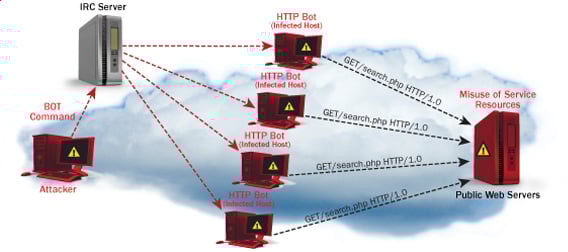
  • Distributed DoS– this type of attack is performed by a number of compromised machines that all target the same victim. It floods the network with data packets.
Ultimate guide to DoS(Denial of Service) Attacks

How DoS attacks work

Let's look at how DoS attacks are performed and the techniques used. We will look at five common types of attacks.

Ping of Death

The ping command is usually used to test the availability of a network resource. It works by sending small data packets to the network resource. The ping of death takes advantage of this and sends data packets above the maximum limit (65,536 bytes) that TCP/IP allows. TCP/IP fragmentation breaks the packets into small chunks that are sent to the server. Since the sent data packages are larger than what the server can handle, the server can freeze, reboot, or crash.

Smurf

This type of attack uses large amounts of Internet Control Message Protocol (ICMP) ping traffic target at an Internet Broadcast Address. The reply IP address is spoofed to that of the intended victim. All the replies are sent to the victim instead of the IP used for the pings. Since a single Internet Broadcast Address can support a maximum of 255 hosts, a smurf attack amplifies a single ping 255 times.  The effect of this is slowing down the network to a point where it is impossible to use it.

Buffer overflow

A buffer is a temporal storage location in RAM that is used to hold data so that the CPU can manipulate it before writing it back to the disc. Buffers have a size limit. This type of attack loads the buffer with more data that it can hold. This causes the buffer to overflow and corrupt the data it holds. An example of a buffer overflow is sending emails with file names that have 256 characters.

Teardrop

This type of attack uses larger data packets. TCP/IP breaks them into fragments that are assembled on the receiving host. The attacker manipulates the packets as they are sent so that they overlap each other. This can cause the intended victim to crash as it tries to re-assemble the packets.

SYN attack

SYN is a short form for Synchronize. This type of attack takes advantage of the three-way handshake to establish communication using TCP. SYN attack works by flooding the victim with incomplete SYN messages. This causes the victim machine to allocate memory resources that are never used and deny access to legitimate users.

DoS attack tools

The following are some of the tools that can be used to perform DoS attacks.

  • Nemesy– this tool can be used to generate random packets. It works on windows. This tool can be downloaded from http://packetstormsecurity.com/files/25599/nemesy13.zip.html . Due to the nature of the program, if you have an antivirus, it will most likely be detected as a virus.
  • Land and LaTierra– this tool can be used for IP spoofing and opening TCP connections
  • Blast– this tool can be downloaded from http://www.opencomm.co.uk/products/blast/features.php
  • Panther- this tool can be used to flood a victim's network with UDP packets.
  • Botnets– these are multitudes of compromised computers on the Internet that can be used to perform a distributed denial of service attack.

DoS Protection: Prevent an attack

An organization can adopt the following policy to protect itself against Denial of Service attacks.

  • Attacks such as SYN flooding take advantage of bugs in the operating system. Installing security patches can help reduce the chances of such attacks.
  • Intrusion detection systems can also be used to identify and even stop illegal activities
  • Firewalls can be used to stop simple DoS attacks by blocking all traffic coming from an attacker by identifying his IP.
  • Routers can be configured via the Access Control List to limit access to the network and drop suspected illegal traffic.

Hacking Activity: Ping of Death

We will assume you are using Windows for this exercise. We will also assume that you have at least two computers that are on the same network. DOS attacks are illegal on networks that you are not authorized to do so. This is why you will need to setup your own network for this exercise.

Open the command prompt on the target computer

Enter the command ipconfig. You will get results similar to the ones shown below

Ultimate guide to DoS(Denial of Service) Attacks

For this example, we are using Mobile Broadband connection details. Take note of the IP address. Note: for this example to be more effective, and you must use a LAN network.

 Switch to the computer that you want to use for the attack and open the command prompt

We will ping our victim computer with infinite data packets of 65500

Enter the following command

ping 10.128.131.108 –t |65500

HERE,

  • "ping" sends the data packets to the victim
  • "10.128.131.108" is the IP address of the victim
  • "-t" means the data packets should be sent until the program is stopped
  • "-l" specifies the data load to be sent to the victim

You will get results similar to the ones shown below

Ultimate guide to DoS(Denial of Service) Attacks

Flooding the target computer with data packets doesn't have much effect on the victim. In order for the attack to be more effective, you should attack the target computer with pings from more than one computer.

The above attack can be used to attacker routers, web servers etc.

If you want to see the effects of the attack on the target computer, you can open the task manager and view the network activities.

  • Right click on the taskbar
  • Select start task manager
  • Click on the network tab
  • You will get results similar to the following

Ultimate guide to DoS(Denial of Service) Attacks

If the attack is successful, you should be able to see increased network activities.


Hacking Activity: Launch a DOS attack

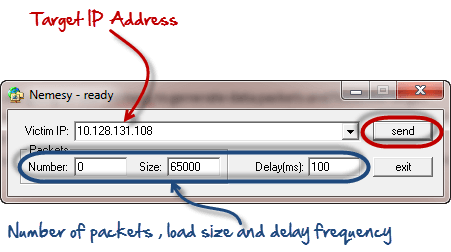
In this practical scenario, we are going to use Nemesy to generate data packets and flood the target computer, router or server.

As stated above, Nemesy will be detected as an illegal program by your anti-virus. You will have to disable the anti-virus for this exercise.

Ultimate guide to DoS(Denial of Service) Attacks

Enter the target IP address, in this example; we have used the target IP we used in the above example.

HERE,

  • 0 as the number of packets means infinity. You can set it to the desired number if you do not want to send, infinity data packets
  • The size field specifies the data bytes to be sent and the delay specifies the time interval in milliseconds.


Click on send button

You should be able to see the following results

Ultimate guide to DoS(Denial of Service) Attacks

The title bar will show you the number of packets sent

Click on halt button to stop the program from sending data packets.

You can monitor the task manager of the target computer to see the network activities.

Summary

  • A denial of service attack's intent is to deny legitimate users access to a resource such as a network, server etc.
  • There are two types of attacks, denial of service and distributed denial of service.
  • A denial of service attack can be carried out using SYN Flooding, Ping of Death, Teardrop, Smurf or buffer overflow
  • Security patches for operating systems, router configuration, firewalls and intrusion detection systems can be used to protect against denial of service attacks.
@EVERYTHING NT
More articles

Tuesday, June 9, 2020

Any Indian DigiLocker Account Could've Been Accessed Without Password

The Indian Government said it has addressed a critical vulnerability in its secure document wallet service Digilocker that could have potentially allowed a remote attacker to bypass mobile one-time passwords (OTP) and sign in as other users to access their sensitive documents stored on the platform. "The OTP function lacks authorization which makes it possible to perform OTP validation with

via The Hacker News

Related articles


  1. Pentest App
  2. Pentest Security
  3. Pentest Vs Ceh
  4. Hackerrank
  5. Hacker Wifi Password
  6. Pentest Windows
  7. Pentest Tutorial
  8. Hacking To The Gate
  9. Hacking Websites
  10. Pentest Jobs
  11. Pentest Standard
  12. Hacking Images
  13. Pentestlab
  14. Hacking Images
  15. Pentest Practice Sites

Monday, June 8, 2020

Evil Limiter: Taking Control Of Your Network Bandwidth


Ever wanted to block someone from the network or limit their bandwidth without having the network admin privileges? Well Evil Limiter has got you covered then.


An amazing tool to help you control your network without having access to the admin panel.

Today I'm gonna show you how to use this interesting tool to take control of your network.


Requirements:

1. A PC or Laptop with Linux OS.
2. A Network Adapter.
3. Access to the Network you want to control.
4. sudo or root access on your Linux OS.

First of all we will download the tool from its github repository:

https://github.com/bitbrute/evillimiter

You can download and extract the zip file from the link above or you can clone evillimiter repository using git like this:


git clone https://github.com/bitbrute/evillimiter 


Now lets install the downloaded tool on our machine

Step 1: Move inside the downloaded github repository

cd evillimiter


Step 2: To install type


sudo python3 setup.py install


wait for the installation to finish (May take some time)


Step 3: To run type


sudo evilimiter


Voila! That's it, you got it up and running on your machine


Now how do you control your network with it, its very easy.

It should detect your network automatically but yeah you can set it up manually as well using the command line argument -i.

After you have selected the right interface to control, you need to scan your network for live hosts. To perform the scan type


scan


you can pass an optional flag to the scan command which is range which will help you to specify the range of ip addresses you want to scan like this


scan --range 192.168.1.1-192.168.1.100


The above command will scan a total of 100 hosts from 192.168.1.1 to 192.168.1.100


Now after you have scanned your network next thing is to list the hosts that have been discovered during the scan for that you type the hosts command like this


hosts


Now you know the hosts on your network and now you should know which host you wanna block or limit based on the mac address of the host. Remember the host id of the host that you want to block or limit bandwidth of and lets do the magic.

to block a host from using the internet we simply specify the block command followed by the host id of the host that we want to block like this

block 1


if instead of blocking the host we just want to limit his internet bandwidth we can do just that by using the limit command followed by the host id and then the bandwidth that we want to allocate to that particular host like this


limit 1 100kbits


Wohooo! yeah its that easy and yes you can do all this without having the network admin role.

Now if you want to show mercy on that poor guy (blocked host), you can set him free by using the free command followed by the host id like this:

free 1


Well isn't administrating your network bandwidth so easy now.

Hope you enjoyed this tutorial.:)

More articles


  1. Hacking Typer
  2. How To Pentest A Website
  3. Hackerx
  4. Pentestmonkey Cheat Sheet
  5. Pentestmonkey Cheat Sheet
  6. Hacking Ethics
  7. Hackerx
  8. Pentest Hardware
  9. Pentest Azure
  10. Hacking To The Gate
  11. Hacker On Computer
  12. Pentesting And Ethical Hacking
  13. Pentest Linux
  14. Hacker Google
  15. Pentest Training
  16. Pentest Vs Ethical Hacking

10 Best Wifi Hacking Android Apps To Hack Others Wifi (Without Root)

 Top 10 Best wifi hacking apps to hack wifi^s.   

Today, a smartphone without internet is like a decade ago featured phone which is mainly used to dial and receive the call. No one would even want such a phone today. The Internet is now a necessity for every mobile user. They can't live without the internet and unfortunately; if the Internet is not working due to some signal issues; they get frustrated and sometimes depressed too.


Generally, we need to pay for the Internet subscription package to run mobile data on our smartphone. But what to do if I don't want to spend money on the Internet? The solution is to connect your mobile with WiFi. You can access the internet from there. Easy, right? NO, it's not easy until you know the password of WiFi. But what if you don't know.

Two ways possible in this situation

  1. Either you ask for the password to the owner; he will provide you to use his internet through Wi-Fi
  2. You have to hack the Wi-Fi password of other's network and use the internet as an unauthorized person.

First is not reliable when you don't know the person so, you only have a second option. Today, I am going to share a few apps that help you steal the password and allow you to use the internet from others' account.

1. WiFi WPS WPA Tester

This is the foremost tool to hack the WiFi password without knowing even the root. This is a preferred choice of numerous smartphone users to decipher the pin and get access to the Wi-Fi. As time passes, a tool is upgraded and now even hack the WiFi networks while it was used to check if an access point is highly vulnerable to the rancorous attacks or not.

If you are using Lollipop or above version on your android mobile phone; you don't even need to root your device to crack a WiFi network.

Android App

Pros

  • Easy to use
  • Free
  • Decrypt the password in no time.
  • Implementation of several algos like Zhao, Arris, Dlink and more.

Cons

  • Need root access if you are using the version below Lollipop.

2. WPS Connect

Routers which has enabled a WPS protocol can be hacked with this app. The important thing is that almost all routers found in public places and homes fall under this category. In short, you will have what you want. Moreover, you can focus on your router & examine that it's vulnerable to any malicious attack or not. It helps you hack the WiFi password without root and also strengthen your WiFi network.

Once you identify the vulnerable (accessible) network, you can quickly get the password and start using the internet without any hassle. It uses algorithms like easyboxPIN and Zhao. Although, this app is not compatible with various Android phones as it is tested on Android devices like the Galaxy series, Nexus and more.

Android App

Pros

  • It's free and easy to use
  • Powerful algorithms (Zhao & easyboxPin) to crack the password
  • Supports pinning of Wi-Fi routers

Cons

  • Incompatible with few android devices
  • Couldn't identify the network automatically.

3. WiFi WPS WPA Tester Premium

This is an excellent app to decrypt the WiFi network password on your android phone. This works fine on rooted & non-rooted android phones. If you can root the Android device; you can have a better chance to hack into. Today,  security is the primary concern and so, many people use the highly secured wireless router, I think. For such networks, this app will not work as it should be. But, still it can work for numerous times with the help of WPS; not all the time. Every time, you have to try your luck to get access to other's WiFi network. This WPS WPA tester is a premium apk.

Android App

Pros

  • Works for both rooted and non-rooted android devices
  • Find the nearby network and connect your mobile with it.

Cons

  • It's a premium apk.
  • You have to try your luck to get access to the nearby network.
  • Not good to connect with highly secured wireless routers.

4. AndroDumpper Wifi (WPS Connect) – Discontinued

If you want to connect to a router which is WPS enabled; download this app immediately without going down to browse for other apps. Just open the app, start its interface & find the nearby wireless networks, you want to connect with. The app will provide an excellent option to regain the password of a selected network with & without root. Once you implemented the algorithm; it will display the password in app screen & connect to the network. Isn't it easy for you?

Android App

Pros

  • It's Free on Google Play Store
  • Easy to use and faster than some other tool.
  • Works fine for rooted & non-rooted devices
  • A dedicated blog is available for the tool (Get guidance anytime)
  • Supports for giant company routers (Vodaphone, Asus, Huawei, Dlink, etc.)

Cons

  • Rooting is required if you are using a version below android 5.0
  • Works only for WPS enabled routers.

5. Wi-fi Password Hacker Prank

Wifi Password hacker prank is a free app for the android users and can help you to connect your android phone to wifi networks available nearby. This free app simulates a process of hacking the wireless network with your smartphone. With this app, you can hack all wifi network passwords with just one key. The Prank word itself says it's a funny app used to prank with your friends. Sometimes, girls can be impressed with this prank as well. But try this at your own risk. Look excellent and professional in front of your friends and colleagues.

Steps to Hack Wifi using the Wifi Password Hacker Prank:

  • Catch up the wireless networks near to you and then select the secure network you wish to hack.
  • Wait for a while & a dialogue will be opened with the wifi password.
  • Bingo! Paste the password and start using others' Internet without spending single money.
  • Watch your favourite show and movie in High-Definition quality without worrying about your mobile data.
Android App

6. WiFi Warden

WiFi Warden is one of the finest and free android WiFi hacking apps to get access to others WiFi with ease. With WiFi Warden, a user can Analyze the WiFi networks, connect to your WiFi using the passphrase and WPS and view saved WiFi passwords without root.

By analyzing the WiFi networks, you can see all necessary information that can be discovered on the wireless networks around including BSSID, SSID, Channel bandwidth, encryption, security, router manufacturer, distance and channel number, etc.

Android App

Pros

  • Find the less crowded channel to get WiFi access.
  • You can root your device on all Android versions.
  • Easy to use and connect with the router quickly.
  • All features of this app are available for free.

Cons

  • This app doesn't work on all types of router, use a passphrase instead.
  • Access Point (AP) must have enabled WPS.
  • Require Android version 6 (Marshmallow) or higher version is necessary to display Wi-Fi networks around you.
  • Some of the features are in the testing phase. So, use it your own risk.

7. WiFi Password

'WiFi Password' is a completely free app for those who don't want to get away from the Internet even when their internet data is running out. You can connect with others' WiFi routers and use their Internet.

If you are using Android Version 5 or above; 'WiFi Password' can be the right choice for you to watch your favorite shows on YouTube in HD without even worrying about Mobile Data.

Android App

Pros:

  • Millions of WiFi Hotspots
  • Scan and detect the WiFi security
  • Connect WiFi Hotspot nearby without knowing the WiFi Password
  • You can simply add a free WiFi Hotspot by sharing the passwords with others.

Cons :

  • Still, there are some glitches in it but works well.

8. WiFi Kill Pro

WiFi Kill is one the best WiFi network controller application which can disable the Internet connection of others who are connected to the same network. Yes, this is true. It is a useful tool for internet users who want to improve their data speed by disabling other's internet connection and allocate all the bandwidth to your device only.

Currently, this app is only for Android users and needs root access to perform well.

Android App

Pros


    • You can see all connected device on the same network you are connected.

    • Display the data transfer rate of all devices

    • Monitor network activity

    • You can cut the network connection of any connected device.
  • It works well on tablets too.

Cons


    • Require root access
  • Require Android version 4.0.3 or up to use this app.

9. Penetrate Pro

A popular Wifi hacker app for android users, Penetrate pro is free and works well on Android devices. This app is widely used to find WEP and/or WPA keys to connect the devices with network routers without knowing the wifi password. Just install the app and search for the network; this app starts automatically displaying the WEP/WPA keys on the screen. Tap on the network you want to connect; one it gets connected; you can start watching videos on YouTube. Quite interesting, doesn't it?

Android App

Pros


    • Easy to search nearby free wifi networks.

    • Connect the network without knowing keys
  • Available for Free

Cons


    • Not available on Google Play Store; need to download manually.
  • Works well only for the rooted android devices

So, you have got the list of apps that help you use the internet from other's wireless network without getting caught. If you have any idea of any other Wi-Fi password hacking app; just let me know. We would love to discuss it here.


Disclaimer: VR Bonkers is not responsible for any consequences if you face while using any of the above apps. This is just a list and we are not taking any responsibility for the same. So, use them at your risk.


@EVERYTHING NT

Continue reading
  1. Hacking Box
  2. Hacker Prank
  3. Hacking Gif
  4. Pentest Wifi
  5. Pentest Red Team
  6. Hacking Google
  7. Hacking Simulator

OWASP Announcement

🕬  OWASP Announcement:


The OWASP Foundation has been chosen to be 1 of 50 Open Source Organizations to participate in the inaugural year of the Google Season of Docs program.

The goal of Season of Docs is to provide a framework for technical writers and open source projects to work together towards the common goal of improving an open source project's documentation. For technical writers who are new to open source, the program provides an opportunity to gain experience in contributing to open source projects. For technical writers who're already working in open source, the program provides a potentially new way of working together. Season of Docs also gives open source projects an opportunity to engage more of the technical writing community.

We would like to thank the OWASP members that donate their time and knowledge as administrators and mentors. It would not be possible if not for these individuals:
Spyros, Fabio, and Konstantinos 


More info

Sunday, June 7, 2020

Probing For XML Encryption Weaknesses In SAML With EsPReSSO

Security Assertion Markup Language (SAML) is an XML-based standard commonly used in Web Single Sign-On (SSO) [1]. In SAML, the confidentiality of transferred authentication statements against intermediaries can be provided using XML Encryption [2]. However, implementing XML Encryption in a secure way can be tricky and several attacks on XML Encryption have been identified in the past [3] [4]. Therefore, when auditing a SAML endpoint, one should always consider testing for vulnerabilities in the XML Encryption implementation.

This blog post introduces our latest addition to the SAML Attacker of our BurpSuite extension EsPReSSO: the Encryption Attack tab. The new tab allows for easy manipulation of the encrypted parts within intercepted SAML responses and can, therefore, be used to quickly assess whether the SAML endpoint is vulnerable against certain XML Encryption attacks.


Weaknesses of XML Encryption

Implementations of XML Encryption can be vulnerable to adaptive chosen ciphertext attacks. This is a class of attacks in which the attacker sends a sequence of manipulated ciphertexts to a decryption oracle as a way to gain information about the plaintext content.
Falsely implemented XML Encryption can be broken using:
  • an attack against the CBC-mode decryption (quite similar to a padding oracle attack) [3] or
  • a Bleichenbacher attack against the RSA-PKCS#1 encryption of the session key  [4].
SAML makes use of XML Encryption and its implementations could, therefore, also be vulnerable to these attacks.

XML Encryption in SAML

To support confidential transmission of sensitive data within the SAML Assertion, assertions can be encrypted using XML Encryption. An EncryptedAssertion is shown in the abridged example below.

<EncryptedAssertion>
  <EncryptedData>
    <EncryptionMethod Algorithm="http://www.w3.org/2001/04/xmlenc#aes128-cbc"/>
    <KeyInfo>
      <EncryptedKey>
        <EncryptionMethod Algorithm="http://www.w3.org/2001/04/xmlenc#rsa-1_5"/>
        <CipherData>
          <CipherValue>
            [...]
          </CipherValue>
        </CipherData>
      </EncryptedKey>
    </KeyInfo>
    <CipherData>
        <CipherValue>
          [...]
        </CipherValue>
    </CipherData>
  </EncryptedData>
</EncryptedAssertion>

The EncryptedAssertion contains an EncryptedData element, which in turn is the parent of the EncryptionMethod, KeyInfo, and CipherData elements.  SAML makes use of what is referred to as a hybrid encryption scheme. This is done using a session key which symmetrically encrypts the payload data (the example uses AES-128 in CBC mode), resulting in the ciphertext contained in the EncryptedAssertion/EncryptedData/CipherData/CipherValue child element. The session key itself is encrypted using an asymmetric encryption scheme. In our example, RSA-PKCS#1.5 encryption is used with the public key of the recipient, allowing the contents of the the EncryptedKey child element to be derived from the KeyInfo element. 

Encryption Attacker

Our BurpSuite extension EsPReSSO can help detect vulnerable implementations with the newly integrated Encryption Attacker within EsPReSSO's SAML module.

Once a SAML response which contains an EncryptedAssertion has been intercepted, open the SAML tab, select the Attacks pane, and choose Encryption from the dropdown menu. This works in Burp's Proxy, as well as in the Repeater tool, and is depicted below.
As sketched out above, the symmetric session key is encrypted using the recipient's public key. Since the key is public, anybody can use it to encrypt a selected symmetric key and submit a valid encryption of arbitrary messages to the recipient. This is incredibly helpful because it allows us to produce ciphertexts that decrypt the chosen plaintexts. To accomplish this, one can purposefully send invalidly padded messages, or messages containing invalid XML, as a method to trigger and analyze the different reactions of the decryption endpoint (i.e, turning the endpoint into a decryption oracle). To facilitate these investigations, the new Encryption Attacker makes this process dead simple.
The screenshot above shows the essential interface of the new encryption tab:
At the top, the certificate used to encrypt the symmetric session key can be pasted into the text field. This field will be pre-filled automatically if the intercepted SAML message includes a certificate in the KeyInfo child element of the EncryptedData element. The Update Certificate checkboxes above the text area can be used to include the certificate in the manipulated SAML message.
In the Symmetric Key text field, the hexadecimal value of the symmetric session key can be set. Choose the asymmetric algorithm from the dropdown menu and click Encrypt key -- this will update the corresponding KeyInfo elements of the intercepted SAML message. 

The payload in the text area labeled XML data can now be entered. Any update in the XML data field will also be reflected in the hexadecimal representation of the payload (found on right of the XML data field). Note that this is automatically padded to the blocklength required by the symmetric algorithm selected below. However, the payload and the padding can be manually adjusted in the hex editor field.

Eventually, click the Encrypt content button to generate the encrypted payload. This will apply the changes to the intercepted SAML message, and the manipulated message using Burp's Forward or Go button can now be forwarded, as usual.

Probing for Bleichenbacher Oracles

Bleichenbacher's attack against RSA-PKCS1 v1.5 encryption abuses the malleability of RSA to draw conclusions about the plaintext by multiplying the ciphertext with adaptively chosen values, and observing differences in the received responses. If the (error-) responses differ for valid and invalid PKCS1 v1.5 ciphertexts, Bleichenbachers' algorithm can be used to decrypt the ciphertext without knowing the private key [6].

To determine whether or not a SAML endpoint is vulnerable to Bleichenbacher's Attack, we simply need to check if we can distinguish those responses received when submitting ciphertexts that are decrypted into invalidly formatted PKCS1 v1.5 plaintexts, from the responses we receive when sending ciphertexts that are decrypted into validly formatted plaintexts. 

Recall that PKCS1 v1.5 mandates a certain format of the encrypted plaintext, namely a concatenation of a BlockType 00 02, a randomized PaddingString (PS) that includes no 00 bytes, a 00 (NULL-byte) as delimiter, and the actual plaintext message. The whole sequence should be equal in size to the modulus of the RSA key used. That is, given the byte length k of the RSA modulus and the message length |m|, PS has the length |PS| = k - 3 - |m|. Furthermore, PKCS1 v1.5 demands that |PS| to be at least eight bytes long [5]. 

In SAML, the recipient's public key is usually known because it is published in the metadata, or even included in the EncryptedAssertion. For this reason, we do not need to fiddle around with manipulated ciphertexts. Instead, we simply submit a validly formatted RSA-PKCS1 v1.5 encrypted message and an encrypted message which deciphers into an invalidly formatted plaintext. As an example, assume an RSA public key of 2048 bits which we want to use to encrypt a 16 byte session key `01 02 03 04 05 06 07 08 09 0A 0B 0C 0D 0E 0F 10` (hexadecimal representation). |PS|$ is $2048/8 - 3 - 16 = 237, so a valid PKCS1 v1.5 plaintext, ready to be encrypted using `AA` for all 237 padding bytes, could look like the listing shown below.

00 02 AA AA AA AA AA AA AA AA AA AA AA AA AA AA
AA AA AA AA AA AA AA AA AA AA AA AA AA AA AA AA
AA AA AA AA AA AA AA AA AA AA AA AA AA AA AA 00
01 02 03 04 05 06 07 08 09 0A 0B 0C 0D 0E 0F 10
In the Encryption attack pane of EsPReSSO, ensure that the correct public key certificate has been added to the Certificate field. Insert a valid plaintext, such as the one above, into the Symmetric Key field and select Plain RSA encryption from the Algorithm drop down menu. Click the Encrypt button to compute the RSA transformation and apply the new EncryptedKey element to the intercepted SAML message. Now, submit the message by clicking Burp's Go or Forward button and carefully inspect the response.

Next, repeat the steps outlined above, but this time submit an invalid PKCS1 v1.5 message. For example, consider using an invalid BlockType of `12 34` instead of `00 02`, or replace the `00` delimiter so that the decryptor is unable to determine the actual message after decrypting the ciphertext. If you are able to determine from the recieved responses whether or not the submitted ciphertext decrypted into a valid PKCS1 v1.5 formatted plaintext, chances are high that the decryptor can be used as a Bleichenbacher oracle. Don't forget to take into account the actual XML data, i.e., the assertion encrypted with the new session key; by submitting valid or invalid XML, or by removing signatures from the SAML message or the assertion you may increase your chances of detecting differences in the returned responses.

Probing for Oracles in CBC-Mode Decryption

Another known attack on XML Encryption is aimed at the Cipher Block Chaining (CBC) mode, which can be used with the block ciphers AES or 3DES [2]. The attack is described in detail in this referenced paper [3] and is quite similar to Padding-Oracle attacks on CBC mode; the malleability of CBC mode encryption enables the attacker to perform a bytewise, adaptive manipulation of the ciphertext blocks which are subsequently sent to the decryptor. In most cases, the manipulated ciphertext will not decrypt to valid XML and an error will be returned. Sometimes, however, the plaintext will be parsed as valid XML, in which cases an error is thrown later on at the application layer. The attacker observes the differences in the responses in order to turn the decryptor into a ciphertext validity oracle which can be used to break the encryption.  Due to some particularities of the XML format, this attack can be very efficient, enabling decryption with about 14 requests per byte, and it is even possible to fully automate the process [7].

In order to determine if a particular SAML service provider is vulnerable to this attack, we can avoid the cumbersome ciphertext manipulation, if we are in possession of the decryptor's public key:
In the Encryption Attacker tab of EsPReSSO, add the public key certificate to the Certificate field (if necessary) and insert a symmetric key of your own devising into the  Symmetric Key text field. Select an appropriate RSA encryption method and click the Encrypt button to apply the new EncryptedKey element to the original SAML message. 

An XML message can now be inserted into the XML data text field. Select a CBC mode encryption algorithm and click Encrypt to apply the changes. As in the example above, press Burp's Go or Forward button to send the message and carefully inspect the response. Try sending invalid XML, e.g., by not closing a tag or using the `&` character without a valid entity and keep an eye open for differences in the returned responses. To manipulate the padding, the text field on the right side shows the hexadecimal representation of the plaintext, including the CBC padding. If you send a single block and set the last byte, which indicates the padding length to the blocksize, i.e. 16 or 0x10 for AES, the ciphertext should decrypt into an empty string and is generally considered "valid" XML.

Please refer to the original paper for more details, tips, and tricks for performing the actual attack [3]. 

Summary

The new XML Encryption attacker included in EsPReSSO can help security auditors to quickly assess if a SAML endpoint is vulnerable to known attacks against XML Encryption. To this end, the decryptor's public key is used in order to send suitable test vectors that can be provided in plaintext. Ciphertext manipulation is, therefore, not required. The actual process of decrypting an intercepted SAML message is, however, considered out of scope and not implemented in EsPReSSO.

In case you wonder how XML Encryption can be used in a secure fashion, here are some considerations [6]:
  • Always use an authenticated encryption mode such as AES-GCM instead of the CBC-mode encryption.
  • Using RSA-PKCS1 v1.5 within XML Encryption is particularly difficult to do in a secure manner, and it is recommended to use RSA with Optimal Asymmetric Encryption Padding (OAEP) instead [2].
  • Apply a digital signature over the whole SAML response, and ensure it is properly validated before attempting to decrypt the assertion. This should thwart the attack as a manipulated response can be recognized as such and should be rejected.
----------
Read more

Saturday, June 6, 2020

New USBCulprit Espionage Tool Steals Data From Air-Gapped Computers

A Chinese threat actor has developed new capabilities to target air-gapped systems in an attempt to exfiltrate sensitive data for espionage, according to a newly published research by Kaspersky yesterday. The APT, known as Cycldek, Goblin Panda, or Conimes, employs an extensive toolset for lateral movement and information stealing in victim networks, including previously unreported custom

via The Hacker News

Continue reading


  1. Pentest +
  2. Pentest Methodology
  3. Rapid7 Pentest
  4. Pentest Magazine
  5. Pentest Iso
  6. Pentest Tutorial
  7. How To Pentest A Website With Kali
  8. Hacking Tutorials
  9. Hacker Software
  10. Hacker Typer
  11. Pentest Services
  12. Hacking Health
  13. Basic Pentest 1 Walkthrough
  14. Hacker Keyboard
  15. Pentest Website
  16. Hacking Meaning
  17. Hacker Ethic
  18. Pentest Ftp
  19. Hacking Process